Online Chat
Office Hours: 24/7
Start Chat


 |
|
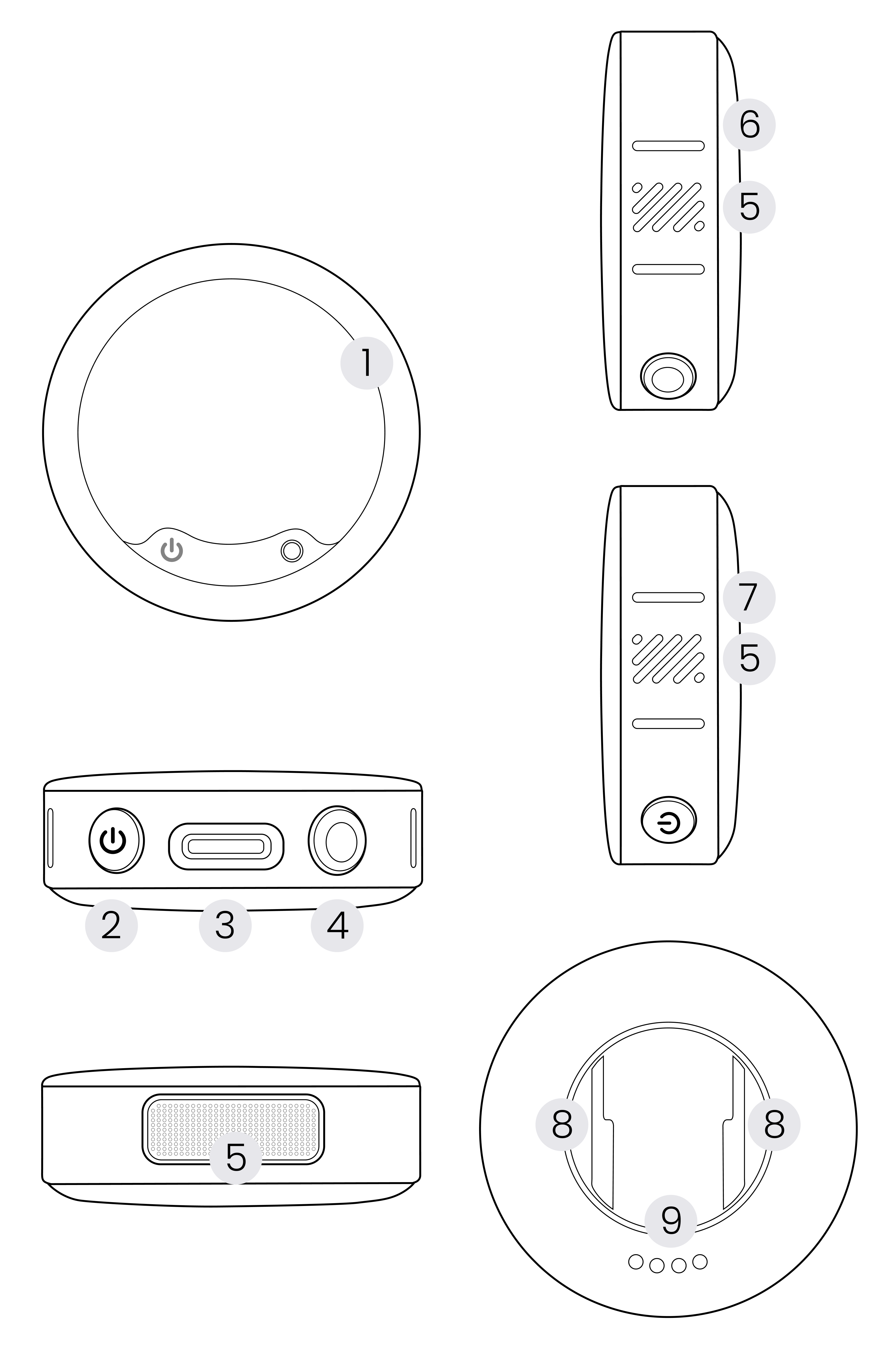
| 1. E-Ink Screen: Displays custom patterns. | 6. Recording Status Indicator: Indicates whether the mic is in an internal recording** state. For specific indicators, please refer to the "Transmitter Indicators" section. |
| 2. Power Button: Performs operations such as power on/off, pairing, start/end recording*, turn on/off Noise Canceling, etc. For details, please refer to the "Transmitter Buttons" section. | 7. Function Indicator: Indicates whether the mic is using Noise Canceling, pairing, etc. For specific indicators, please refer to the "Transmitter Indicators" section. |
| 3. USB-C Port: Used for charging, connecting to a computer to copy internally recorded audio files, or connecting an external lavalier microphone via a USB-C to 3.5mm adapter. | 8. Back clip slot: Used to secure the back clip, allowing the Transmitter to be fixed on clothing. The area between the two slots is a magnetic area, which can secure the button magnet. For specific operations, please refer to the "Wearing the Transmitter" section. |
| 4. Internal Recording Button: Press once to start/stop recording using the Transmitter. | 9. Charging Contacts: Used for charging when connected to the Charging Case. |
| 5. Microphone: Three-Microphone Array, with a wider pickup range, delivering higher-quality sound pickup. | |
* When the Mic Pro Transmitter is connected to an Insta360 camera via Bluetooth, or the Receiver is connected to a mobile phone via an adapter, the Power Button can control shooting; when connected to a digital camera using a 3.5mm audio cable, it does not support controlling shooting.
** Internal recording of the Transmitter: Refers to the Transmitter storing recorded audio files locally without the need to connect to a Receiver or other devices. This is suggested as an alternative when conditions are unstable (e.g., the distance between the Transmitter and Receiver is too far, there are obstacles between the Transmitter and Receiver, or the wireless channel at the recording site is interfered with by other devices, etc.).
.svg)

