Multi-Device Wireless Cascading
Insta360 Wave For Business supports wireless cascading of multiple devices (at least 3 devices supported via a future OTA update). With this feature, you can flexibly deploy multiple Wave units in different locations of a large meeting space. They work collaboratively to expand pickup and playback coverage, ensuring that speech from any corner of the room is clearly captured and clearly played back via the speakers, easily meeting the needs of large team collaborations and complex meeting scenarios.
Core Functions
- Expanded Audio Coverage: When multiple Wave units are cascaded, the user designates one as the primary device and the others as secondary devices. They work together as a unified audio system to effectively expand the microphone pickup range and speaker playback coverage area.
- Flexible Deployment (primary-secondary architecture): In this mode, your meeting computer or smartphone only needs to connect to the primary device. Secondary devices do not need separate connections, simplifying deployment and better adapting to complex conference room layouts and wiring conditions.
- Intelligent Sync: Audio streams are intelligently synced wirelessly between the primary and secondary devices, ensuring that audio pickup across the entire space is comprehensive and playback is clear and lag-free.
Usage and Connection Solutions
You can choose between two cascading solutions based on your meeting room layout and equipment: first, cascading an Insta360 Connect with one or more Waves (future OTA support required) for an audio-visual expansion solution; second, wirelessly cascading multiple Waves for expanded pure audio coverage.
Scenarios are explained below.
Scenario 1: Cascading with Insta360 Connect (Expanded Pickup)
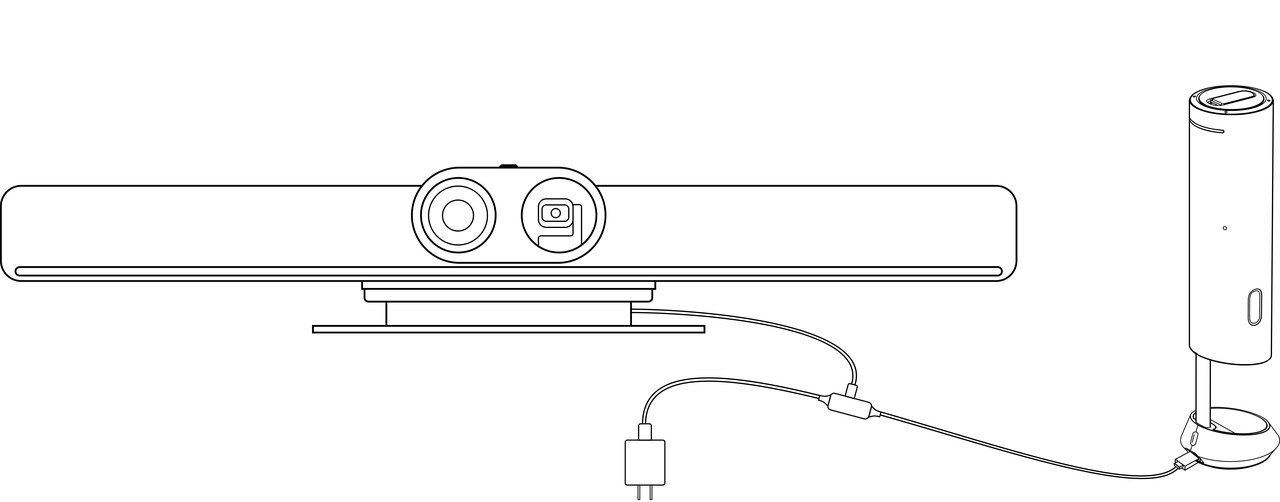
In this scenario, the Connect acts as the core device responsible for video and audio output, while the Wave acts as an audio expansion unit working in coordination.
- Connection Method
- In this mode, the Insta360 Connect connects to the computer as the primary device, and the Wave connects to the Connect as an audio expansion unit. The Wave's USB-C port is used for communication with the Connect, so it no longer needs to be connected to the computer.
- For specific connection and deployment details, please refer to the "Using with Insta360 Connect" section.
Scenario 2: Cascading Multiple Waves
In this scenario, multiple Wave units form a pure audio system, with one acting as the primary device connected to the computer. Secondary devices do not need a direct connection to the computer; they will automatically form a network with the primary device.
- Connection Method
- Simply connect the Wave acting as the primary device to your meeting computer. Secondary devices do not need a direct connection to the computer.
- Primary Device Connection: Connect the primary Wave to the computer via the standard USB-C data cable. In this connection mode, multiple Wave units can be cascaded via Wi-Fi signal.
Tip: Please update to the latest firmware in a timely manner to use the full features. Additional Insta360 Wave devices required for multi-device cascading must be purchased separately.




.svg)

